Tuesday, May 31, 2011

SlimCleaner crowdsources power cleaning


Take an overpowered Windows cleaning utility and wed it to the crowd, and you've got the free SlimCleaner 1.6 (download). The cleaning utility can do just about anything you can think of, from deleting browsing tracks to uninstalling programs to cleaning up the assorted file detritus that daily use of your computer creates. What makes this particular program interesting is that, like Soluto, it draws on anonymously contributed data from its users to help keep your system running like a well-oiled machine. Unlike Soluto, SlimCleaner is really for advanced users, people comfortable mucking around in Windows system settings.

SlimCleaner's main window will probably cause confusion for beginning users and even some intermediate ones.


Although the collection of tools here is robust, and the scans are surprisingly fast, the crowdsourced utility is what makes SlimCleaner interesting. The program uses an in-house process called "authoritative ranking" to evaluate each user's ranking submissions. A user's ranking is rated against that person's previous levels of accuracy, and then weighed against other users who are known to have highly accurate rankings. Evaluations that are too far outside the mean get flagged.

The program is divided into six sections: Cleaner, Optimize, Uninstaller, Shredder, Hijack Log, and Windows Tools. Most people will be concerned with the first four components. The Hijack Log provides an interactive list of running components on your computer. This includes toolbars, services, start-up entries, ActiveX components, drivers, and codecs. The list is useful, but it's a diagnostic tool that only advanced users will be able to parse without assistance.

The Cleaner is also the program's main landing page. The tool is designed to delete data that gets automatically stored on your computer, such as temporary files and browsing tracks, and so the first thing you see is a bulleted list of categories that you can clean. Although the program launches into a list, you can toggle cleaning each one individually via a radio button next to the listing. There are also three categories that can be cleaned: Windows system, Browser, and Applications.

It's on the Optimize and Uninstaller pages that you first begin to interact with SlimCleaner's ratings and on-the-fly help options.
(Credit: Screenshot by Seth Rosenblatt/CNET)

SlimCleaner has a robust selection of tools, yet there isn't a lot of obvious guidance for newcomers. The phenomenal selection is made up of options that are easy to use if you know what they mean or don't mind looking them up. Unfortunately, most people will find the program obtuse and confusing, and that makes it hard to navigate because it's not readily apparent where you are or what you're doing.

While the Cleaner is for removing tracks, SlimCleaner's Optimize feature is where the Startup and Services managers live. From here, you can toggle which programs and services run on start-up. Conveniently, there's a Restore list as well, so items you disable can easily be re-enabled. This is also where you'll see the community ratings first come into play, as each item has a color-coded community rating and a More Info button. As micromanaging Windows functions can be complicated even for people with experience, the additional resources are an excellent idea.

The Optimize and Uninstaller sections have nearly identical layouts, which makes sense given that their functions are similar. There are two RAM and CPU usage gauges on the top, followed by the list of items to toggle or uninstall, the aforementioned community rating, and more info buttons. There's also a search feature so you can easily sift through long lists.
http://www.blogger.com/img/blank.gif
Like other free file shredders, SlimCleaner's Shredder gives you four levels of file deletion. You can choose from a single overpass for basic deletion, a three-pass option, a seven-pass option, and the Guttman 35-pass level.

All these features combine to make for a robust Windows cleaning utility that just lacks a better layout and more on-the-fly explanations of what some of the options do. While the crowdsourcing aspect is innovative, SlimCleaner faces an uphill battle in getting users to care enough to spend time rating utilities when there are far more interesting things going on in the world.

By : Cnet
read more...

Avast Free Antivirus

Installation
Installing Avast is a painless process that compares well against its free competitors like AVG, although--like those competitors--it's much slower than installing paid programs like Trend Micro, Kaspersky, or Norton.

Some items of note during the installation that will come up later in the review: to completely avoid the new Windows 7 and Vista desktop gadget, or the new WebRep browser add-on, you must choose the Custom install option and uncheck those here.

Automatic installation of these features is frowned upon, although Avast does provide a clear method for uninstalling them. It's just http://www.blogger.com/img/blank.gifnot as simple as a check box that gets its own installation window, since you have to go through the Customize menu, which makes the auto-install sort of surreptitious.

On the plus side, installing Avast doesn't require a reboot, and using its uninstall tool we detected no remnants in the Registry or on the desktop. Avast has said that the installer has shrunk for all three versions by about 20 percent, although it's still a large download at around 57MB for the free version.

Read more: Avast Free Antivirus - Free software downloads and software reviews - CNET Downloads

Interface
Avast 6's interface is virtually identical to the previous version's. Perhaps the most major change, aside from a slight lightening of the gray in the color scheme, is the removal of the Windows Explorer-style forward and backward buttons. We actually liked those, since they made it easy to return to a previous pane, no matter how deeply into the settings you had explored.

The only other change is the addition of the Additional Protection tab to the left nav area, which hosts the new AutoSandbox and WebRep feature controls.

For users new to Avast, the sleek user interface is a change that came at the end of 2009. The gray-and-orange color scheme stands out well on the screen, and the tab-based navigation on the left makes it easy to navigahttp://www.blogger.com/img/blank.gifte between features. Highlighted with the familiar security colors of green for safe and red for dangerous, the Summary tab gives up-to-date info on shield status, auto-updates, virus definitions, the program version, and whether the silent/gaming mode is on. There's also an unobtrusive ad urging you to upgrade to Avast Internet Security 6.
http://www.blogger.com/img/blank.gif
The Summary tab contains a second submenu, Statistics. If you're curious to see how Avast's shields have been performing against threats, here's where you can get your math geek on. For each shield, it tells you how many files were scanned and when, and presents the data in a concise graph.

DOWNLOAD Avast Free Antivirus


By : Cnet
read more...

Friday, October 15, 2010

AVG Anti-Virus Free Edition 2011


The new AVG Internet Security 2011 has sped up its installation process, although it's not as zippy as the minute-long installations that some of AVG's competitors offer. We found that the program can go from completed download to ready to use in about 5 minutes. Gains might have been made elsewhere, but a big contributing factor to that is that AVG has cut down the number of install screens users see, from 13 in the previous version to 5 in the 2011 version.

AVG's toolbar is still an opt-out feature. It also will commandeer your default search engine for Yahoo, so if you don't want it to do that, you'll have to uncheck the box that changes your search engine, too. Also unchanged is registration, which is a free process and can be completed from within the AVG interface.

Users who opt out of installing the toolbar but want it later will need to rerun the installer to get that component.

AVG Internet Security has some new protective features this year, too. The software offers what it calls "smart scanning," which leverages AVG's behavioral detection network to scan known safe files once, and only rescan them if it detects changes. As with its competitors, AVG's network is made up of its user base anonymously contributing data up to the cloud. You can choose to opt out of contributing your data when you install, or from the options menu. AVG says opting out won't negatively affect your security.

Downloads


By : Cnet
read more...

Opera 10.63, delivers fixes in security and usability


Plugged security holes and stability fixes come to fans of the Opera browser as its Norwegian publisher released version 10.63 on Tuesday.

Available for Windows, Mac, Opera 10.63 patches numerous problems that could have posed security risks, including a cross-domain check bypass that allowed data theft, a site address spoof, a reload and redirect problem that also could've allowed spoofing and cross-site scripting, a problem reported by Microsoft that allowed private video streams to be intercepted, and a flaw that caused JavaScript to run in the wrong security context after manual interaction.

Other problems that were addressed include Opera Link freezing on startup, Opera Unite Messenger not loading, the start bar blanking out after opening a background tab, and a ramping up of CPU usage to 100 percent when starting Opera.

Users who've enabled Opera's automatic updates should be upgraded from version 10.62 without having to do anything. Opera 10.63's changelog's can be read for Windows, Mac.

Downloads for Windows

Downloads for Mac
read more...

Thursday, June 24, 2010

IP Sniffer 1.98.1.7


IP Sniffer is a suite of IP Tools built around a packet sniffer. The packet sniffer can work on all Windows versions using either: the new raw socket implementation of Windows2000 (driverless), WinPcap (needs to be installed), a NDIS protocol (needs to be installed , no reboot). IP sniffer is a protocol analyzer, that will use the XP/2K Raw Socket features. IP Sniffer is also a suite of IP Tools like: IP trafic monitor, IP statistics, ARP (list & deleter entries, send request), Netbios Names, Route Print, Netstat (shows process attached to a connection, kill attached process, kill tcp entry), Network informations (Params, Adapters, Cards), Spoofing (TCP, UDP, ICMP, ARP), WINS Query, DNS Query (using win32 DNSAPI), DHCP Find, WHOIS, Resolve IP/Hostname, PING (Host & Subnet), TCP Scan (Host & Subnet).

Downloads


By : Cnet
read more...

Wednesday, June 2, 2010

Camfrog Video Chat 5.5.238


If you're sick of hopping from one chatware program to another, looking for the perfect mix of video, audio, and text socializing, CamFrog might be what you're looking for.

The chat rooms feature everything from music lessons to sign language to non-English chatting, and integrating video, audio, and text components are a great leap forward for chat communities since a Webcam is not a requirement. Be warned, though: There's also a slew of X-rated chat rooms--this is not a program that kids should use without supervision.

The interface should be familiar to anyone who has used any messaging software. You can create your own chat room and password-protect it, and the Contacts list has a section for favorite rooms and one-click contact adding, user searching, and profile management. New in Version 5 is high-resolution video support, interface tweaks, and the ability to send little "virtual gifts" to both friends and anonymous recipients that borders on the annoying.

Cautious users should note that the install includes several toolbars and a Weather Channel widget, which you can opt out of. Despite those drawbacks, if you're looking for a well-trafficked video chat program that serves a diverse community, CamFrog is cool place to land.

Downloads


By : Cnet
read more...

Tuesday, June 1, 2010

Sharp World Clock 4.7


It's one world, but keeping track of the time on the other side of the planet requires a little help and a better timepiece than the Windows system clock. One of the best is Sharp World Clock, as clean and accurate a handle as the international timekeepers it displays. You can easily set it to display any number of configurable digital or analog clocks at once in a row or grid; change their sizes, colors, backgrounds, and other aspects; and display national flags for quick visual identification. You can also show day or night indicators, sunrise and sunset times, lunar phases, time zones, and more. It also boasts a zoom-capable world map depicting day and night areas, a configurable alarm clock, a calendar with a reminder feature, and the ability to add your own audio files for alarm sounds.

Both the clocks the program creates and its efficient, intuitive interface are unusually attractive and competently configured without being cluttered or garish, making subtle but effective use of color for highlighting and emphasis, even in the command dialogs. The clocks themselves, and the analog clock faces in particular, have high visual impact and readability, even at distance or a glance, but without resorting to flashy, distracting designs. In fact, they make good use of Vista-style highlighting to achieve the look of real instruments instead of a virtual display.

Downloads

By : Cnet
read more...

Monday, May 31, 2010

Trillian Astra 4.2


If it isn't enough to chat with friends from Google, MySpace IM, Skype, and Facebook, as well as AIM, ICQ, MSN, Yahoo, and IRC on Trillian't multinetwork IM app, you can comfortably count the app's deep hooks into Twitter and Facebook alerts and checking e-mail (both POP3 and IMAP varieties) as reasons for switching from your current messenger.

Among its best social networking traits, Trillian will automatically shorten URLs in your tweets, and handle direct messages, re-tweets, and replies. Twitter Trends can show up in your contact list, and you can get tweets to appear in tooltip form. Facebook features include news feed integration, Facebook in-box checking, and synchronized message updating in addition to Facebook IM. Just on these features alone, Trillian Astra offers a bit more than its IM competitors.

In addition, there's support for drag-and-drop file transferring, skins, notifications, and all sorts of tweaking in the preference menu. Trillian earns a thumbs-up for previewing a Web site when you hover the cursor over a URL in the conversation window, but the same feature is less effective and less accurate when applied to looking up definitions of terms found within the chat window (luckily, you can turn the helpers off.)

Legacy users will be pleased to know that Trillian Astra (code for version 4.0 and up) runs lighter than previous versions, and you're less likely to notice system slowdowns because of memory leaks. Video chat gets basic support. The paid upgrade gives you browser-based IM from Trillian.im, full-screen video and filters, many more visual customizations, multiple simultaneous file transfer, and themes, as well as tech support. These features are available for the first 30 days you use the free version, then they deactivate. The biggest changes, besides the reskinned interface, are the long-needed performance improvements and support for a broad range of IM protocols. Longtime fans won't be disappointed with the changes, though those using the free version clearly won't get the full effect of Trillian's more-advanced features.

Downloads

By : Cnet
read more...

Tuesday, May 11, 2010

FreeZ Online TV 1.30


While we love the idea of free TV (who doesn't?), it never seems to be quite what we hoped. FreeZ Online TV is no exception. The channel selection is unimpressive and user guidance is nonexistent.

The most confusing things about the program are the links that appear on the initial screen when the program is opened. We mistakenly believed they might provide more guidance for the program but instead directed us to two different sites promising free online TV. Both require additional downloads, and weren't related to FreeZ Online TV.

That said, once we explored those two false leads, the program itself proved fairly easy to operate, although disappointing in its outcomes. A standard viewing screen sits next to a file tree with 16 main categories, including News, Entertainment, and Weather. Within each category are at least a half dozen channel choices, but many are not in English. Simply click one and it begins playing. The typical media controls to stop, start, pause, etc., become visible at the bottom of the screen as the content buffers. What you won't find are any guides to the channels, which seem randomly selected from various countries around the world. All you get are the call letters (like WSTV) or largely unrecognizable names like NOS Journaal. We also found that many of the listed channels didn't play at all. There are no user settings, so you can't delete or add your own channels, and no Help file or other user guidance is available.

During installation, a box is pre-checked that will add the FreeZ Online TV Toolbar, so be sure to uncheck this if you don't want this little extra. Or, better yet, skip the download altogether and avoid not only the toolbar but this unimpressive program as well.

Download

By : Cnet
read more...

BitSpirit 3.6.0.401


BitTorrent technology has revolutionized the way we share files, making the transmission of movies, large pieces of software, and entire albums of music a relatively quick process. There are many torrent-sharing clients out there to choose from, and BitSpirit is one of the better ones we've encountered. There's nothing flashy about it; it's just a well-designed, easy-to-use piece of software that makes sharing torrents a breeze.

BitSpirit's interface is attractive and intuitive, and even users with rudimentary torrent knowledge will be able to figure it out. Clear, well-labeled buttons give users access to the program's major functions, and the layout is well-organized and easy to navigate. A small, unobtrusive toolbar with adjustable opacity lets users keep an eye on their torrents even when using other programs. Actually using the BitSpirit is extremely simple; we had no trouble downloading a torrent or creating a new torrent to share. We especially liked that BitSpirit lets users organize downloaded files by media type, making it easy to locate music, books, movies, software, and more. There was nothing about BitSpirit that really wowed us, but that's OK; if a program does the basics and does them well, sometimes that's all you need. We do wish that BitSpirit had a proper Help file instead of a paltry online FAQ, but that's our only major criticism. On the whole, we liked BitSpirit very much.

BitSpirit is free. It installs politely but leaves a folder behind upon removal. We recommend this program to all users.

Download

By : Cnet
read more...

Luxand Blink 2.0


Blink and you'll miss it. This free program adds an extra level of security to your computer through your Webcam, associating your face with your username and password so you can start using your computer after a few seconds of looking at your Webcam.

When you install the program, it will offer to run a wizard to help you set it up. The wizard will autodetect your Webcam, and give you a choice if you have more than one. After giving you a screen to click through, which serves to give you more of a chance to compose yourself for the scan, the program takes about 10 seconds to add your image to its database. The publisher Luxand, known for its facial-recognition algorithms, claims that the program is powerful enough to see through minor adjustments to your visage, including eyeglasses, facial hair changes, and even sunglasses. During tests with printed color photos of the reviewer's face, the program wasn't fooled. Blink was, however, able to see through sunglasses in less than 3 seconds, the same amount of time it took to log in an unaltered version of a registered face.

Blink is not the only program that adds an extra level of security to your computer through your Webcam, but it is one of the only free ones. It supports multiple users, creates a log of those who try to access the computer, offers a "learning" convenience setting and a high security setting, and the run at start-up option can be toggled off.

It has one major drawback: it only works on 32-bit computers. Considering that more and more new computers are coming out with Windows 7 x64, the lack of 64-bit support could be fatal sooner rather than later. However, for right now that's a problem that most Windows users probably won't notice. The program also doesn't allow your face to replace Web site log-ins, a logical extension of what it does. Simple in function, Blink is a must-try for its novelty, but you might just wind up keeping it for its effectiveness.

Download

By : Cnet
read more...

Saturday, April 24, 2010

McAfee VirusScan Definition 5961


With thousands of new viruses created every day, relying on traditional security updates isn't enough anymore. That's why we added McAfee Active Protection™ technology.

Unlike the competition, this exclusive feature instantly analyzes and blocks new and emerging threats in milliseconds so there's no gap in your protection. It detects more threats to your PC than ever before.


Features and Benefits

1. Exclusive McAfee Active Protection technology

Revolutionary McAfee Active Protection technology provides the fastest protection against malicious threats to your PC. Unlike the competition, new and emerging threats are analyzed and blocked in milliseconds, so you don't have to wait for regular updates to arrive.

2. Anti-Virus/Anti-Spyware

Detects, blocks, and removes viruses, spyware, adware, even rootkits—insidious programs designed to tamper with your PC.

3. Two-Way Firewall

Blocks outsiders from hacking into your PC.

4. McAfee SiteAdvisor

Helps you know about a website's risks before you click to stop malware threats. Advanced "phishing" protection alerts you to websites that may try to steal your identity or gain access to your financial information. Provides site ratings in 22 popular search engines.

5. McAfee SiteAdvisor Plus

Stay safe with instant message and email link checking. Identifies and prevents you from clicking on harmful website links in your browser, email, or instant messages.

Download McAfee VirusScan Definition 5961

by: cnet
read more...

TuneUp's easy ID3


A couple years back, iTunes faithful were rewarded with TuneUp Companion, a handy plug-in that makes filling in, cleaning up, and correcting ID3 tags for tracks in one's music library a cinch. Now, those who prefer Windows Media Player for their music management and playback have been invited to the party. As of today, users will be able to download a version of the software for WMP from the TuneUp Web site. Even better, the first 50 CNET readers to e-mail TuneUp will receive a code to activate a Gold account, which regularly costs $29.95.

Those who opt for TuneUp Gold won't be subjected to the restrictions of the Lite version of the software, which only allows you to to clean up 1,000 songs and add 50 pieces of cover art to the tags. In addition to automatically downloading missing album art, the program offers a super straightforward "click to clean" interface that mounts directly within the right-hand frame of WMP.

Along with the TuneUp app for WMP, the company is launching a new feature called Tuniverse, which allows users to access comprehensive artist information by clicking on an artist or song shared via the software.
In addition to offering a no-hassle tool for cleaning up your ID3 tags, TuneUp includes a few other handy features. For instance, simply play a track and the plug-in window will populate artist bios, on-demand music videos from YouTube, and even upcoming concert information with links to buy tickets. You can also share your "Top 5" artists, albums, and songs directly via Facebook and Twitter.

by: cnet
read more...

Wednesday, April 21, 2010

Helicon Ape


Helicon Ape is implemented as managed IIS7 module, but can be installed as .NET module on any ASP.NET-compatible IIS version as well. It works transparently for both server and client and can even be installed on a shared hosting account without administrative access.

And there is free version of Ape which can be installed on up to 3 web sites on any server at no cost.
Compatibility

* modification-free transition of Apache web sites to IIS;
* easy configuration of PHP and other Unix-oriented Web applications for IIS;
* powerful, fully Apache-compatible URL rewriting syntax ĂŻ¿½ no rules redesign is necessary.

Usability

* user-friendly manager — configuration editing, syntax highlighting, help, testing utility in one place;
* plain text configurations — no XML;
* per-site installation without hosting administration participation;
* on-the-fly links, headers and HTML body modification.

Security

* customizable user authentication/authorization settings;
* comprehensive protection from DoS attacks and hotlinking (content leeching);
* all-round web request debugging with HTTP-level web developer toolset.

Performance

* full-fledged reverse and forward proxy functionality;
* drastic server speed-up due to finely adjustable compression and cache functions.

Download Helicon Ape

by: cnet
read more...

Symantec unveils 2011


Norton Internet Security 2011 is the company's full suite, offering antivirus, antispyware, firewall, and antispam tools. In past years, Norton's security software has been dinged by some for being slow and chewing up too much memory. But Symantec said it is sought to improve its 2011 versions to coax them to install and scan faster and use up less memory.

The company added that it's moving beyond security by offering a new feature called System Insight 2.0, which can alert users when other applications are grabbing too much memory and system resources. Also new to the 2011 Internet Security and AntiVirus products is Download Insight 2.0, which will scan downloads delivered through your browser, e-mail, or instant messaging program.

Features revamped for 2011 include Norton Identity Safe, which is designed to help create and manage all of your passwords, and Norton Safe Web, which analyzes and rates search results from Google, Yahoo, and Bing to make sure sites are free of malware.

The free Norton Rescue Tools provides two individual utilities designed to clean up malware, according to Symantec. Cybercriminals are increasingly employing one popular scam: sending people phony messages telling them they've caught a virus and then offering to install antivirus software. Of course, the "antivirus software" is actually malware that itself infects PCs.

The Norton Power Eraser attempts to remove malware that conventional security software may not be able to eliminate. And the Norton Bootable Recovery Tool helps you create a rescue disc that you can use in the event your system is so badly compromised that it's unusable.

Symantec is also debuting a few free security tools. Norton Safe Web Lite is a free version of the aforementioned tool designed to alert people to unsafe Web sites among search results. Norton Safe Web for Facebook is geared toward combating Koobface and other malware specifically targeted toward social-networking sites.


Download Norton Internet Security 2011 Beta

Norton AntiVirus 2011 Beta

by: cnet
read more...

Tuesday, April 20, 2010

Microsoft pitches cloud


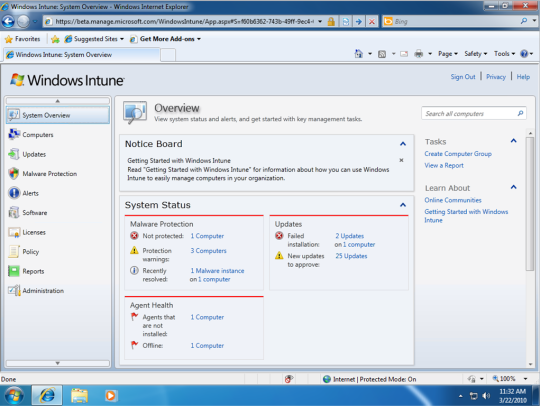
On Monday, the software maker is set to launch a beta for Windows Intune, a service that uses the cloud to offer management, patching, and antivirus capabilities for a company's PCs. When it launches in final form, the Intune service will also include upgrade rights for a company to move its PCs to the enterprise edition of Windows 7. It will also include the Microsoft Desktop Optimization Pack, a collection of asset management, virtualization, and other services that typically are only available for large businesses that have a Software Assurance contract with Microsoft.

Sandrine Skinner, a director in Microsoft's Windows unit, said that Windows Intune is aimed at companies that have up to 500 PCs that are looking to manage their machines with just a small IT staff.
One of the key features of the service is its ability to schedule and manage updates of Windows and other Microsoft software, a capability that in the past required Windows Server Update Services or another management tool.
"We're removing the need to have such a server," Skinner said. Although the Intune service can manage updates to Microsoft software, it can't update third-party software, nor can it handle the initial deployment and installation of programs.
A single Silverlight-based Web console can show an overview of a company's entire fleet of PCs, showing which machines do and don't have the latest updates as well as any issues with malware.

The beta for the online services part of Intune will start this week, Skinner said, with Microsoft aiming to sign up about 1,000 businesses, all in North America. Customers will get a free trial of the online tools, but not the Windows 7 upgrade rights or the desktop optimization pack.
read more...

Friday, April 9, 2010

Internet Acceleration via Traffic Shaping cFosSpeed 5.10


cFosSpeed is a network driver, which attaches itself to existing Internet connections. It then optimizes data transfer by means of Traffic Shaping.
Traffic Shaping is a method for optimizing the Internet traffic. It allows maximum speed while ensuring minimal Ping.

You can use cFosSpeed with a router and/or a DSL-modem or cable-modem. You can also use cFosSpeed with other types of Internet access, ie. whenever you already have an existing Internet connection.
cFosSpeed supports a wide variety of connections, like DSL, cable, ISDN, UMTS, etc.

cFosSpeed :
1. Keep network delays (ping times) small, in order to make Internet applications as responsive as possible.
2. Improve data throughput by avoiding network congestions.

You can use cFosSpeed with an Internet connection you use exclusively or which you share with several PCs.

cFosSpeed feature :
* Broadband: Cabel and DSL
* Narrow band: Modem and ISDN
* Mobile (UMTS, HSDPA, GSM, GPRS, HSCSD)
* Media:
o DSL, PPPoE
o DSL, PPPoA (Vcmux and LLC)
o DSL, PPTP
o VDSL
o Cable
o ISDN
o IP over AAL
o RFC1483/2684 bridged

Download x32 for Windows 7/Vista/XP/2000

Download x64 Edition for Windows 7/Vista/XP/2000
read more...

Thursday, April 8, 2010

FLV Converter 6.7.3


A video search engine integrated into the software allows you to find your videos even more quickly. Find and download videos without opening your browser. You can even watch the videos using the built-in video player.

Search and download videos for free from Youtube, Dailymotion, Google Video, Yahoo Videos, MetaCafe, Veoh, megavideo... You can preview the videos and download them in AVI, iPod, PSO, iPhone, 3GP or FLV (flash) formats.

Free FLV Converter allows you to easily grab and save desired video. This software can convert the videos to Avi, iPod, iPhone, 3GP or Psp format.
This software can also convert all your videos (divx, xvid, mpeg, dvd, avi...) to FLV video (Flash video) with an automatic HTML page creation. You will only have to place the files on your website to share your videos with the entire world.
Compatible with more than 500 video websites.

Compatibility: Windows 2000/XP/2003/Vista/Seven

Download FLV Converter 6.7.3
read more...

She's Out of My League


The storyline of She's Out of My League is not a particularly new one. Average boy (with average friends, average job, annoying family and ex-girlfriend) meets Gorgeous Girl with great job, hot friends, perfect parents and a GQ/Fighter Pilot ex-boyfriend. Sparks, amazingly enough, fly. In League, the average guy is Kirk (played by Jay Baruchel, of Tropic Thunder, Knocked Up, and 2010's Sorcerer's Apprentice,) an unassuming "6". who works in airport security and one day, through a series of only slightly unbelievable events, finds himself meeting and dating the aforementioned perfect girl, Molly a "hard 10." Naturally, Kirk can't figure out why Molly is interested, so enter Kirk's knucklehead friends and family who offer no support, ridiculous advice, and eventually beat Kirk's self-confidence to a pulp... so much so that there's nothing left. for Kirk or for Molly. Hilarity ensues.

Watch Full Movies
read more...

Sunday, March 28, 2010

How to Train Your Dragon


Meet Hiccup Horrendous Haddock III, heir of the Viking chiefdom, but a boy with one very big problem: a hero he is not. "How to Train Your Dragon' is the riotous story of Hiccup's quest to hunt down the fiercest dragon, bring it into submission, and-hopefully-pass his initiation. Instead, he ends up with the smallest, most ornery dragon-it's even toothless! Thus begins the hijinx of the world's most lovable, unlikely hero and a most reluctant "beast." Packed with energetic drawings and plenty of action, this boisterous tale is just right for fantasy fans or anyone with a spirit of adventure. Based on the book by Cressida Cowell.
read more...